
How to Use the N/log Module in NetSuite SuiteScript

If you’ve ever tried debugging a SuiteScript and ended up with cryptic errors or failures, you’re not alone. Fortunately, NetSuite offers a powerful built-in module to help: N/log. This module is your go-to logging tool when writing SuiteScript, and understanding how to use it effectively can save you countless hours of troubleshooting.
What Is the N/log Module?
The N/log module provides functions for writing log messages to the NetSuite script execution log. These messages greatly assist debugging scripts, tracking flow, and capturing dynamic data like record IDs or API responses.
How to Load It
Here’s how you load the N/log module in your SuiteScript:
define([‘N/log’], function(log) {
// Your code here
});
Note: You can use log in any type of script (User Event, Scheduled, Map/Reduce, etc.) as long as you define the dependency correctly.
Main Methods of N/log
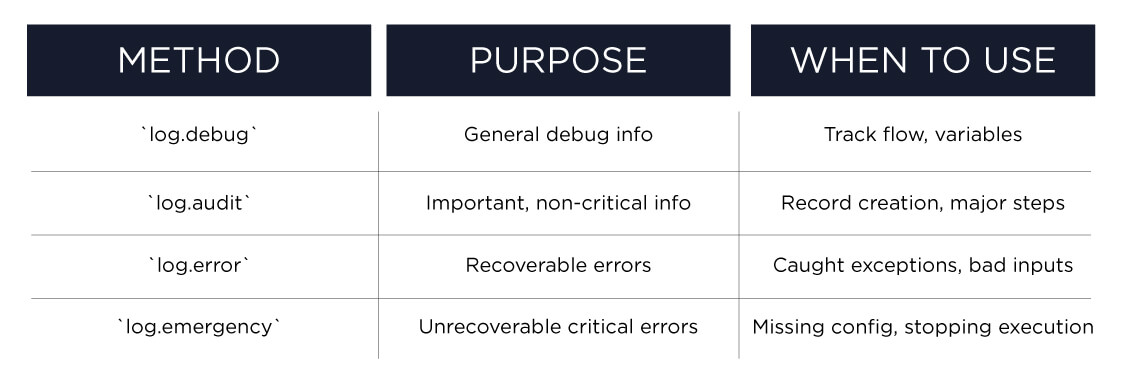
The module offers four primary logging levels:
1. log.debug(options)
Used for general-purpose debugging messages.
log.debug({
title: ‘Debug Message’,
details: ‘This is a debug log for variable x = ‘ + x
});
Use when: You want to track variable values or understand flow without cluttering the execution log with high-severity alerts.
2. log.audit(options)
Log significant events, like record creation or external API calls.
log.audit({
title: ‘Record Created’,
details: ‘Sales Order ID: ‘ + salesOrderId
});
Use when: You want to track crucial checkpoints in your script, especially ones related to data manipulation or integration.
3. log.error(options)
Used to log recoverable errors.
log.error({
title: ‘Failed to Load Record’,
details: ‘Customer record could not be loaded. ID: ‘ + customerId
});
Use when: You encounter a situation that doesn’t stop script execution but still needs attention.
4. log.emergency(options)
For catastrophic or unrecoverable errors. Rarely used but very useful when needed.
log.emergency({
title: ‘Critical Failure’,
details: ‘Script could not proceed due to missing configuration.’
});
Use sparingly: Only when script execution must stop immediately.
Best Practices
- Be concise: Logs should be informative but not overwhelming. Avoid logging large objects or entire record data.
- Use JSON.stringify() for objects: Helps when logging complex data.
log.debug({
title: ‘Context’,
details: JSON.stringify(context)
});
- Avoid logging in loops excessively: Especially in Map/Reduce scripts—this can clutter logs and slow performance.
- Wrap logs in try-catch: To prevent logging from causing its own errors.
Sample Use Case
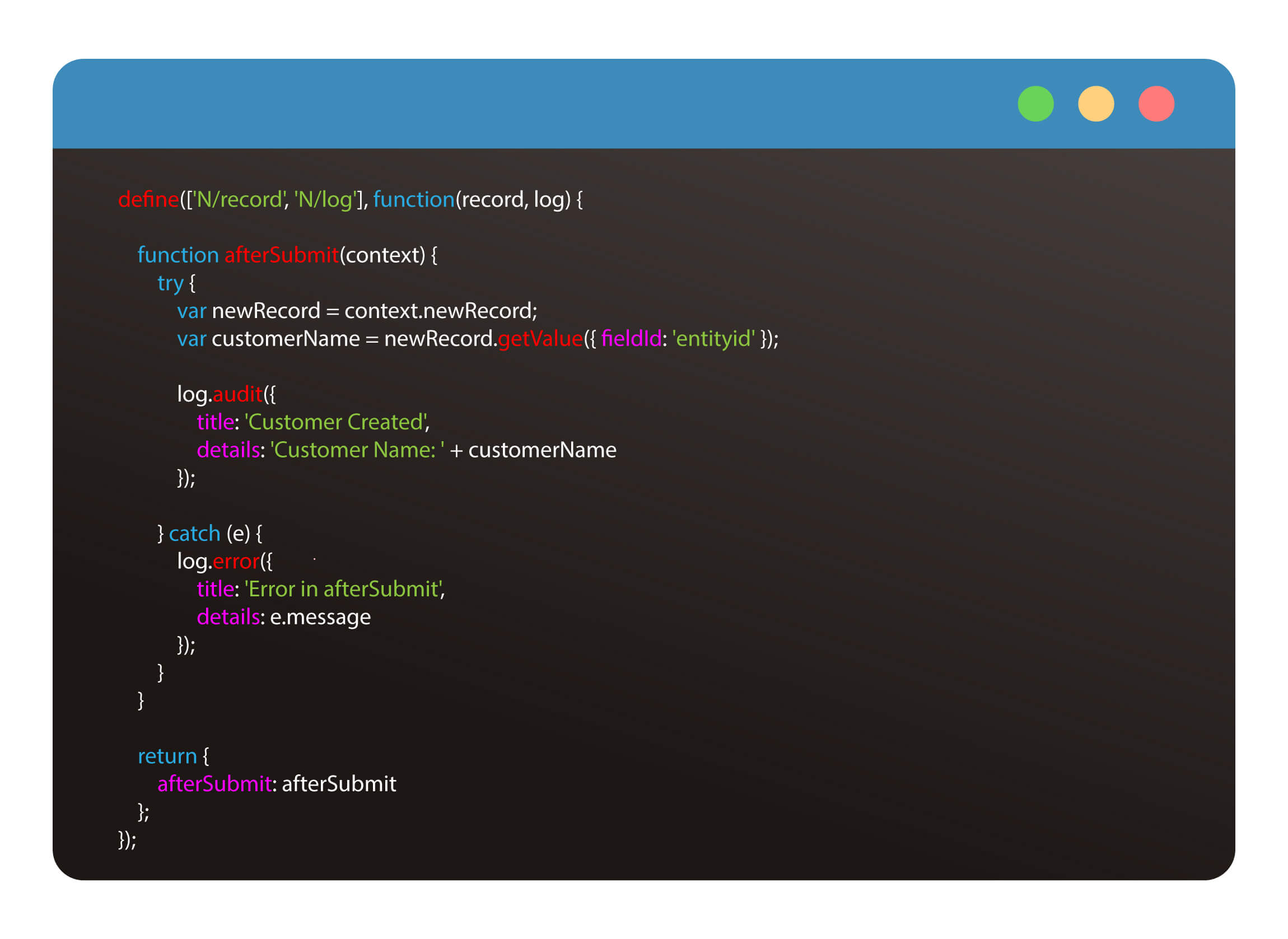
Here’s an example within a User Event script:
Recap:
Using N/log correctly can significantly streamline your SuiteScript development and support efforts. Tailor your logging to the script context and how critical the operation is. Thoughtful logging leads to easier debugging, smoother testing, and cleaner handoffs. We offer expert customization, integration, monthly admin plans, and more at Katoomi. Schedule a call to discuss how we can help you get the most out of your NetSuite implementation.
