
NetSuite Photo Documentation
Katoomi Photo App
Document everything, directly in NetSuite. Take photos in the field, scan a barcode to find the right record, and upload instantly — no more emailing photos to yourself.
Real-time sync to NetSuite File Cabinet
Key Features
Everything you need to capture and organize photos directly in NetSuite — from the field, warehouse, or anywhere your work takes you.
Multi-Photo Capture
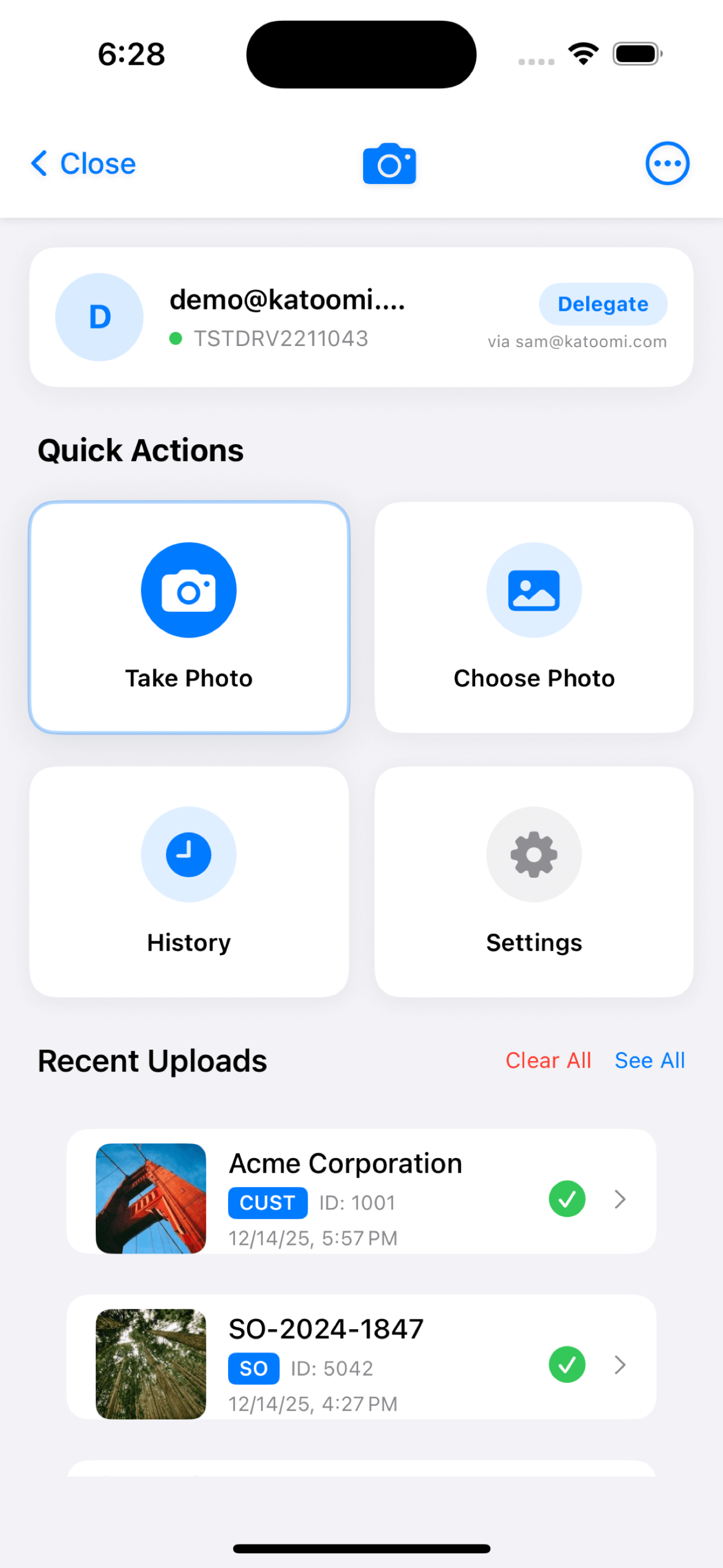
Take one photo or capture multiple in sequence. Select from your camera roll or snap new ones — all uploaded in a single batch to the same NetSuite record.
Barcode Scanning
Scan product barcodes, asset tags, or any Code39/Code128/EAN barcode to instantly find the matching NetSuite record. No typing required — just point and scan.
Smart Record Search
Search by record type and keyword. Find customers by name, items by SKU, orders by number. Recent records appear automatically for quick access.
Real-Time Sync
Photos upload directly to NetSuite File Cabinet in real-time. No waiting for scheduled syncs — your documentation is available immediately in NetSuite.
Upload History
Track every photo you’ve uploaded. View history by date, record type, or status. See exactly where each photo went and when it was uploaded.
Team Access
Invite team members with email-based authentication. No NetSuite licenses required — delegate access to contractors, field workers, and temporary staff.
Attach Photos to Any Record
Upload photos directly to these NetSuite record types — all organized automatically in your File Cabinet.
Customers
Site photos, signage, displays
Items
Product conditions, labels
Sales Orders
Delivery confirmations
Invoices
Proof of delivery, receipts
Purchase Orders
Receiving, damaged goods
Employees
ID photos, certifications
How It Works
Capture Photos
Take one or multiple photos with your iPhone camera, or select from your photo library
Find Your Record
Search by type + keyword, or scan a barcode to instantly find the right NetSuite record
Upload
Photos upload directly to NetSuite File Cabinet in real-time
Linked & Organized
Photos are automatically associated with the record and organized in your File Cabinet
Extend Photo Documentation to Your Entire Team
Enable workers without NetSuite licenses to upload photos on your behalf. Contractors, field workers, and temporary staff can document everything directly into NetSuite — no license required, full audit trail maintained.
How Delegation Works
NetSuite users can authorize delegates — workers without NetSuite access — to upload photos on their behalf. Delegates use the app with their own email, but photos appear in NetSuite under the delegating user’s account.
Perfect For
Warehouse receiving teams, delivery drivers, field service technicians, quality inspectors, installation crews, and anyone else who needs to document their work in NetSuite.
Business Value
Extend NetSuite documentation to your entire workforce without additional licenses. Capture visual evidence from every corner of your operation while maintaining complete audit trails.
Real-World Scenarios
See how teams use the Photo App to solve everyday documentation challenges.
Warehouse Receiving
Carlos receives a damaged shipment on the dock
Carlos scans the barcode on the packing slip — Purchase Order #PO-45892 appears instantly. He photographs the damaged boxes from multiple angles, then uploads all 6 photos in one batch.
Total time: Under 30 seconds
Result
Purchasing sees the photos immediately in NetSuite. Vendor claim documentation is complete before the truck leaves the dock.
Field Service Installation
Maria completes an equipment installation at a customer site
Maria searches “Customer: Acme Manufacturing” and finds the customer record. She photographs the completed installation, serial number plate, and electrical connections — proof that the work was done to spec.
Photos automatically linked to customer record with timestamp
Result
When the customer calls later, anyone on the team can see exactly what was installed and how. No more searching through email for photos.
Delivery Driver POD
James delivers product to a customer location
James photographs the delivery — goods at the loading dock, signature on the delivery receipt, and the location where items were placed. Uploads all to the Sales Order record.
Complete proof of delivery without paperwork
Result
When a customer claims non-delivery, the sales team can instantly pull up timestamped photos proving delivery was made.
Quality Control
Lisa inspects incoming inventory and finds defects
Lisa scans the product barcode to find the Item record. She photographs the manufacturing defect from multiple angles, showing exactly where the quality issue is located.
Visual evidence attached directly to Item record
Result
Purchasing has visual documentation for the vendor return. No disputes about whether the defect existed at time of receipt.
Field Sales Visit
David visits a retail customer to check product displays
David photographs the product display, shelf placement, signage, and competitive positioning. All photos go directly to the Customer record with a single tap.
Visual documentation of retail execution
Result
Marketing and management can see exactly how products are displayed at each location. No more relying on verbal descriptions.
Pricing
Photo App is Included with Katoomi
Included:
- ✓ Real-time photo uploads to NetSuite
- ✓ Barcode scanning for instant lookup
- ✓ Multi-photo batch uploads
- ✓ Upload history tracking
- ✓ Team delegation access
Enterprise Features:
- • Custom folder configurations
- • Advanced compression settings
- • Unlimited team members
- • Priority support
Ready to Document Everything in NetSuite?
Download the Katoomi App and start uploading photos to NetSuite records from anywhere.